Showing posts with label Work In Progess. Show all posts

Wednesday, 25 July 2012

Jump: Tree Scene Blocking

Blocked Malcolm in the last scene.


Going to pass the file on to Rachel so that she can block Aaron. Here's the sketches I did for the blocking. The sketches stop before Malcolm falls because the reference was a bit different to what Malcolm could do in the scene (branches were a bit closer than the 'branches' in the reference footage). I still used the reference for timing but I had an easier time working it out in Maya straight ahead as I could see the space I had to work in better.


Next I'll be blocking Malcolm in the fight scene.

It was suggested that we take individual control of some scenes (for example, I take control of this scene and say Rachel controls the fight scene) and block the entire thing ourselves. The main reason was so that we didn't have to pass it back and forth for timing and changes.
We've thought about it and decided that we were happier doing it this way, even if it's maybe a bit unorthadox. We've already started working the way we're working now (I primarily block Malcolm and Rachel blocks Aaron) and we discussed each other tweaking each other's timing or making minor adjustments to the other character and have agreed that it's fine to do so. So far we've had no problems working in this way. And as they say 'if it ain't broke, don't fix it'.

Rachel's Blog

Thursday, 26 January 2012

Presenter: Blocking 1

I finished blocking the Laurie character last night and left it to render. The clip is a bit too long but I can't shorten it until I have the Fry character moving. Sending this WIP to the lovely Masters masses to share any thoughts on.


Feedback on the latest lip syncing task was that the movements are still a bit too big. It was suggested I take the first arm movement and change that to him scratching his head instead, which I thought was a good idea. I am determined to get it right!! Haha. However, I'm shelving it for the time being because I need to focus on the other two tasks. If I get time at the end I will make the changes. Other than that, my class and tutor seemed happy with it.

The Bites the Dust blocking went down pretty well too, I just need to consider where the camera is going to be. I'm playing with the idea of having the character get all up in the camera's face when he sing 'hey! gonna get you too!' but we'll see how that works.

Monday, 23 January 2012

Presenter: Returning to that task!

So I'm returning to the presenter task now that I've got most things sorted on the other two tasks. I've studied the reference I'd got from uni and have changed it around a bit. Only a bit. Like now the Laurie character is holding the glass. And is drunk :)

Here's a WIP Pic!

Updates soon!

Sunday, 22 January 2012

Another One Bites The Dust: Blocking 2


Feedback from my classmates said that it seemed odd that the character didn't look back when he was moving backwards and to look more at people walking backwards as the walk did not seem right.

I've added a head turn to look backwards and am part way through fixing the backwards walk (still not happy with it). I've also added more breakdowns.

Found some reference videos of people walking backwards here:

Man 1 (Front View)

Man 1 (Side View)

Going to need to take some reference videos of myself walking backwards..

Anyway, sending this video away for feedback. Still needs some more breakdowns and more work on the backwards walk but I like to hear what people think. In case I missed something!

Thursday, 19 January 2012

Rough Blocking: Another One Bites The Dust - Better Render.

Rendered the rough block without all the controls visible. And I fixed a couple of things. This video I'll be sending for feedback, though as said before there is still a lot to do to it.


Timing still needs working out and more extremes need putting in. I'm watching the animation process video I posted before a lot because I want to adopt that way of working. This is the first stage. Next stage will be putting in extremes.

Rough Blocking: Another One Bites The Dust.

Here is the first (very rough!) blocking for the song and dance task. It's just a quick capture video (hence why the controls are visible).


No where near anything I can call 'almost done'. Still a hell of a lot of work to do but uploaded this for an update on what I'm doing.

Wednesday, 28 December 2011

WIP for 'Marriage' Clip


Work in Progress pic :)

Haven't been posting much because I've just been either getting on with building the scene or planning OR enjoying Christmas festivities! It can take me a while to model things because I'm not greatly confident in 3D modelling. However, I think I've outdone myself a bit purely by just biting the bullet and trying. I will admit I do tend to avoid modelling if I can but I'm happy with the results of my efforts. I used google searched images as reference, particularly for the lounge seat, chair and lamp.

Here's the sound clip (uploaded with the above WIP picture purely just so that I could upload it!).


So far I've lip synced Stephen Fry's voice with the Malcolm character shown and positioned him where I want the animation to start. I will start blocking him next.

Here are a few planning sketches I've done so far:


Malcolm character courtesy of AnimSchool.com

Tuesday, 20 December 2011

Lip Syncing: Presenter

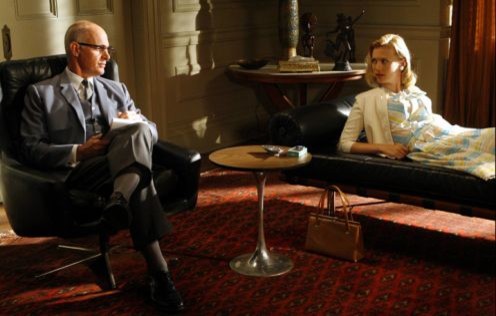
We have another two clips to animate to, one is from a presenter or comedy act and the other is a song. I've started working on the presenter one. The clip is from a Stephen Fry and Hugh Laurie act (I assume from A Bit of Fry and Laurie. I'm not looking it up otherwise I'll get 'tainted'! In other words, influenced by the act) about marriage. The clip sounds like the two are in a bar setting but I'm going to put them in a psychiatric office setting instead to make it a bit different. There will be a bottle of water and a glass on a table to accommodate the glass and liquid sounds.

Here's a couple of google'd  images to show what I'm thinking of:


(Last image (Above) belongs to Set Decorator - Helen Britten)

Here is a work in progress of the scene I'm building:


Friday, 25 November 2011

Final Assignment: Test 1

Here's the first test for AP1 component 2. Still needs more breakdowns and the ball and tail still needs blocking properly but it's getting there. Just uploaded it for feedback. Will continue working on it in the meantime as I need to decide how to end it.


Malcolm character courtesy of AnimSchool.com

Tuesday, 22 November 2011

Remember remember

Not the 5th of November, Constraining!

Just had to figure out how to constrain objects to things (characters mainly) because, well, you forget if you don't do it for a while. Last time I constrained something was somewhere around this time last year. So I'm writing it down here in hope that I won't forget again (or at least if I do, I can come back here!). I even changed the colour of the important bits!


I was trying to attach one end of this box to Malcolm's hand because he's going to carry it. I will have to animate the constrain to unattached it when he comes to letting go of it. But we'll cover that another time.

Firstly I was trying to constrain it by Constrain > Object to Cluster but it wasn't letting me pick any cluster I created or any geometry to create a cluster to attach it to. I enquired the legendary facebook group TagerTalk for advice as I remember it was a fiddly thing to do so perhaps I was forgetting something.

To constrain something this way, first you should create a cluster on the geometry in the area you constrain to (pick point(s) Edit > Create Cluster or Ctrl + L), then create a null and Constrain > Object to Cluster. If the geometry cannot be selected (as was in my case), create a small point cloud (2 x 2 or something, depending on how big a cluster you need) parent it to a bone or joint or whatever is appropriate to get the desired movement and then select points and create a cluster.
Then select the object to be constrained and parent it to the null.

I did this and realised it was not what I needed. I needed the box to be able to rotate with the hand and using this method does not take orientation into consideration. Only tranforms!

So I actually needed to Pose constrain. And this is how I did that with the help of my tutor: As Malcolm does not have any selectable bones in his hand, I had to use his main wrist control. Select the object to be constrained. Click Constrain Compensation (CnsComp button under the constrain menu on right). Constrain > Pose. Done!

Malcolm character courtesy of AnimSchool.com

Sunday, 13 November 2011

Final Assignment for Module 1: Idea

The final assignment will be to combine what we've learned so far:


6. Bringing it all together
Principles employed: arcs, timing, follow through and overlapping action, anticipation, ease 
in ease out, secondary action.
In this exercise your character must walk at some point during the sequence and interact
with two of the following:
A pendulum (swinging thing)
A ball
A ball with tail.
A big box
You are expected to add additional animation in keeping with the personality of your 
character and his/her reason for interacting with the objects.
Duration max: 20 second


I plan to have a ball and tail and a box. My idea (set in a loft) is to have the character walk on screen (poss with heavy box) and notice a 'rat' (ball and tail). He'll leap back away from it but it creeps a bit closer, he keeps a good distance between them. He'll see an empty box beside him and use that to capture it (after a few failed attempts) and sit on it.

I'm currently working on sketches and a storyboard which I'll post up soon.

Friday, 11 November 2011

Walk Scene: Test 4 - Alt. Cam Angle

Tried another camera angle to see if it looked better.


At first glance it looks like the character is limping. His sways are equal but the camera angle isn't the best. In fact I think the first one was better..
Going to try another one after this.

Malcolm character courtesy of AnimSchool.com

Wednesday, 9 November 2011

Walk Task: Alternative Ending

I've found a couple of videos of people playing pranks by sticking pennies on the ground and watching people trying to pick them up. I found them while looking for more reference of people bending down to pick something up.

They made me consider changing the ending to my current task to a more unhappy one; the penny has been glued to the ground so he cannot pick it up, he becomes more miserable! I think it's too late to change it now but if I ever get the chance I would like to experiment with this other ending idea.


Walk Scene: Test 2

Feedback from my classmates and friends say that the character walked too stiffly and his coin catch was a bit slow. So I made the coin catch more snappy and attempted to make the movement more natural, mainly in the walk cycles.


I've sent it for more feedback and I'm hoping it looks better at least.

Malcolm character courtesy of AnimSchool.com

Tuesday, 8 November 2011

Walk Scene: Test 1

I've hit the blindness and can't see what needs working on next. Hate it when that happens!


I'm sure something needs improving. I think the coin flipping could do with something but I've just posted this up on my Masters group on facebook so I'll wait for feedback before doing anything else in fear of ruining what I have already.

Malcolm character courtesy of AnimSchool.com

Monday, 7 November 2011

Coin reference

I've taken a quick video reference of myself flipping a coin, plus a couple of pictures to help get the hand movement/position right.


Walking scene is coming on well. I've finished blocking the animation and am now starting to key between key frames and create more complete actions and animation.

Wednesday, 2 November 2011

Waiting To Start Poses


My terrible modelling skills shown at their worst!
Anyway, three poses for Waiting To Start.

Today was 'Show and Tell' day where we all get feedback on our work.
Feedback for my work:
What's Inside...?
# Pictures need to be more consistant - i.e. camera angles, background/scene.
# First pose is the weakest. Get ref and do it again. Change cam angle.
# Last pose, his face should be much closer to the box.
#All facial expressions could be pushed more.

Waiting To Start:
# Only to add another pose at the start where he's excited to see a movie, looking like he's ready etc.

Malcolm character courtesy of AnimSchool.com

Tuesday, 1 November 2011

What's Inside...? WIP

Been experimenting with a few more poses for 'What's Inside...?' Feedback on the previous images were pretty much in favour of the first and third pose and that the second pose was a bit weak. Particularly too symmetrical. 'Twinning' isn't good for animation and poses so this needs to be sorted.

I put together a quick alternative pose that is similiar other than the arms, to help break the symmetry:

Ignore the untextured table. I think this looks more like he's been caught in the act which wasn't the intention. He's just still being sneaky.

I'm playing with the idea of scrapping this pose all together, having the first pose (Previous post) become the second and replacing the first with one of these (if that all makes sense...).

New Pose 1.

New Pose 2.
Back:

And Front:


So the proposed new sequence would be one of the above images, followed by these two:

Sequence Pose 2.


Sequence Pose 3.


Malcolm character courtesy of AnimSchool.com

Thursday, 13 October 2011

Ball Animation: Work in Prog 2


Here is where I am with the ball animation now. The textures are still not fixed, purely because I didn't render at home where they are. I'm happy with what I have so far but still think it needs some improvement, for example the slow down of the yellow ball. It's doesn't slow down naturally enough. I've been messing around with the fcurves but with no success yet. Perhaps I should re-key that part...

I'm going to post it up on facebook for feedback, hopefully I can tweak it and fix that slow down before Wednesday.

Wednesday, 12 October 2011

Ball Animation: first W.I.P


Here is the first work in progress video which was rendered a day or so ago. I'd only very roughly plotted the 8 ball's animation and hadn't touched the other ball at this point. Unfortunately the textures I had put into the scene were left on my own computer at home and I had rendered this on a computer at university. This will be sorted out before I start rendering final pieces but for the moment I want to concentrate on the animation.

I have just rendered another work in progress video but it will take a while for me to post it here as vimeo takes half an hour to upload a video (because I don't pay for an account). I'll have it posted here by tomorrow with another reference video that I used.