Put Grandma into linear to see how the timing is working. I've also lip synced her in splines (I like to lip sync straight into spline as I can see the mouth movement clearly straight away, I don't know if that's a bad way to work but at the moment it works for me).
I kinda missed the Malcolm rig while I was lip syncing grandma as Malcolm has a really nice facial rig set up with which I find you can get a cleaner lip sync. I'm new to the Norman rig base so maybe I'm just not used to it but I can't seem to quite get the clean mouth shapes that I could with Malcolm.
Hopefully I've done an okay job for the first go though. I've posted it up on the facebook group for some feedback from my classmates. I hope they can give me some advice on how to perhaps make it a bit better.
Showing posts with label Lip Sync. Show all posts
Showing posts with label Lip Sync. Show all posts
Monday, 23 April 2012

Friday, 3 February 2012
Final lip sync task 1
Final render of the first lip syncing task. Made a change after the last feedback session. The first action was too big and it was suggested to put his hand on the back of his head, which is what I've done here:
Fry lip sync test
Quick capture after I've finished lip syncing the Fry character. Looking okay sp far. Going to render it properly with the camera cuts next and send away for last minute feedback.
Thursday, 2 February 2012
Presenter Lip sync test: Laurie
Just rendered a quick capture to make sure the lip sync is timed right with the clip. I'm wondering if the character's moving too fast? He is meant to be drunk so he's supposed to be a bit wibbly.
Will see what the lovely classmates think.
Will see what the lovely classmates think.
Sunday, 29 January 2012
Another One Bites The Dust: Test
Worked on 'Another One Bites The Dust' a fair bit. I've changed the camera angle since the feedback. I've also added more breakdowns, the lip syncing, couple of bits and pieces for the background and lighting and I've now put the animation on splines.
Ever since watching Keith Lango's video on cleaning up your animation I've been taking more care and changing the way I clean up my animation. When someone told me my animation needed cleaning up or needed more polishing, I'll admit I didn't really understand what it meant. Or at least I realised I didn't understand when I watched that video. It was like being hit in the face with a brick epiphany. I didn't need to add more key frames, I needed to take them out! So I've started the cleaning up process much sooner than after I've completed all the breakdowns. I've started noticing keys that don't need to be while adding breakdowns and delete them.
It's great :D
As for my animation, with the change in camera angle I'm now a bit worried that the microphone is in front of his face too much so that the lip sync can't be seen much. I'm sending it for feedback so I'll wait and see what my classmates think. Other than that and the obvious and inevitable polishing it needs, I think it's coming along nicely :)
Ever since watching Keith Lango's video on cleaning up your animation I've been taking more care and changing the way I clean up my animation. When someone told me my animation needed cleaning up or needed more polishing, I'll admit I didn't really understand what it meant. Or at least I realised I didn't understand when I watched that video. It was like being hit in the face with a brick epiphany. I didn't need to add more key frames, I needed to take them out! So I've started the cleaning up process much sooner than after I've completed all the breakdowns. I've started noticing keys that don't need to be while adding breakdowns and delete them.
It's great :D
As for my animation, with the change in camera angle I'm now a bit worried that the microphone is in front of his face too much so that the lip sync can't be seen much. I'm sending it for feedback so I'll wait and see what my classmates think. Other than that and the obvious and inevitable polishing it needs, I think it's coming along nicely :)
Monday, 23 January 2012
Lip Sync: Redo 3
Feedback mainly said that the eyes could do with being more 'snappy' and that perhaps a blink before and after the 'bog-eyed' look would help the transition. So that is what I've worked on plus added a few more breakdowns here and there.
Sending this away again for feedback.
I applied what I learned from the blinks video I'd posted before, particularly using the eye deformers to 'squish' the eyes a bit when blinking. This makes the face look more connected as the eye deformers move the eyebrows and cheeks slightly too. I think it looks more natural and appealing, I hope it looks that way to an audience too!
Sending this away again for feedback.
I applied what I learned from the blinks video I'd posted before, particularly using the eye deformers to 'squish' the eyes a bit when blinking. This makes the face look more connected as the eye deformers move the eyebrows and cheeks slightly too. I think it looks more natural and appealing, I hope it looks that way to an audience too!
Friday, 20 January 2012
Lip Sync: Redo 2
New animation with further polishing. Sending this to my class mates for feedback.
I think it still needs a lot of work (of course it does!) but I'd like to see what other people suggest, if any, before I go much further. I'll be alternating between this and the song and dance animation.
I think it still needs a lot of work (of course it does!) but I'd like to see what other people suggest, if any, before I go much further. I'll be alternating between this and the song and dance animation.
Thursday, 19 January 2012
Lip Sync: Redo
I'm redoing the animation in my first lip sync task. The feedback was basically that the poses were too big and there was no build up in the action. I've taken and studied the reference and blocked out a different animation.
At the moment, only the body movement is stepped and the lip sync and facial expressions remain the same and in splines. It's going to look a little weird but I don't want to complicate redoing the scene so have left the lip sync and facial expression for adjusting later.
At the moment, only the body movement is stepped and the lip sync and facial expressions remain the same and in splines. It's going to look a little weird but I don't want to complicate redoing the scene so have left the lip sync and facial expression for adjusting later.
Sunday, 8 January 2012
Video Reference for 'Christmas' lip sync
Following the previous post, I asked where to go next because for the life of me, I didn't know. My head just crashed and couldn't reboot! My tutor told me to get someone who hasn't seen the animation to act it out, which I'm still waiting on. However, my classmate had a go for me and sent me the clip.
As soon as I watched it, it clicked. I could see exactly what I should have been doing and how, yes indeedy, there was too much going on in my animation. ALL of the actions were too big. I acted it out myself too and filmed for reference but seeing someone else do the actions really helped me understand what needed to happen and get over the damn blindness!
Here are the videos:
Mine!
And Rachel's!
As soon as I watched it, it clicked. I could see exactly what I should have been doing and how, yes indeedy, there was too much going on in my animation. ALL of the actions were too big. I acted it out myself too and filmed for reference but seeing someone else do the actions really helped me understand what needed to happen and get over the damn blindness!
Here are the videos:
Mine!
And Rachel's!
Thursday, 5 January 2012
Lip Sync: Test 6
Feedback from the last test was to exaggerate the lip sync more and that there was too much going on (esp. with the hands. Basically start with subtle actions and build up. We were shown a good example of this with a clip from Monsters Inc.
However, when it came to tweaking my animation I found I was a bit lost for what to do other than only use one of Malcolm's to gesture at a figurative roof rather than both his hands..
Here's the clip so far:
However, when it came to tweaking my animation I found I was a bit lost for what to do other than only use one of Malcolm's to gesture at a figurative roof rather than both his hands..
Here's the clip so far:
Malcolm character courtesy of AnimSchool.com
Wednesday, 4 January 2012
Lip Sync: Test 5
After feedback today, I've spent most of the afternoon/evening tweaking my lip sync animation with the polishing checklist (a previous post or three ago) in mind.
I'm hoping it looks much better. I think it looks at least a BIT better!
Sending it to the wise facebook masters group for feedback.
I'm hoping it looks much better. I think it looks at least a BIT better!
Sending it to the wise facebook masters group for feedback.
Malcolm character courtesy of AnimSchool.com
The Gruffalo and The Gruffalo's Child
I watched The Gruffalo last Christmas (Christmas 2010) and The Gruffalo's Child this Christmas just gone (2011) and I absolutely love them.
Gruffalo:
Gruffalo's Child:
The sets are beautiful and I love how the characters look in 3D. The animation of the characters feels like stop motion which I think adds so much charm to the piece.
The movement between poses is smooth and natural looking, which is something I really need to work on in my own work. All the movement is paced nicely with no jerks or snaps to poses and the slow in slow out principle has certainly been used.
Also found a 'Making of' video for The Gruffalo:
Watching this makes me want to build sets!
Anyway, watching these films has made me more determined to get the timing right on my animation and focus on making the movements more natural and smooth. I've had some feedback on my first lip sync which has pretty much confirmed that I need to work on polishing the movements, with perhaps a few tweaks here and there. For example, do something more with his eyes at the 'brain fizz' action. I may make them go crosseyed.
Gruffalo:
Gruffalo's Child:
The sets are beautiful and I love how the characters look in 3D. The animation of the characters feels like stop motion which I think adds so much charm to the piece.
The movement between poses is smooth and natural looking, which is something I really need to work on in my own work. All the movement is paced nicely with no jerks or snaps to poses and the slow in slow out principle has certainly been used.
Also found a 'Making of' video for The Gruffalo:
Watching this makes me want to build sets!
Anyway, watching these films has made me more determined to get the timing right on my animation and focus on making the movements more natural and smooth. I've had some feedback on my first lip sync which has pretty much confirmed that I need to work on polishing the movements, with perhaps a few tweaks here and there. For example, do something more with his eyes at the 'brain fizz' action. I may make them go crosseyed.
Wednesday, 28 December 2011
WIP for 'Marriage' Clip

Haven't been posting much because I've just been either getting on with building the scene or planning OR enjoying Christmas festivities! It can take me a while to model things because I'm not greatly confident in 3D modelling. However, I think I've outdone myself a bit purely by just biting the bullet and trying. I will admit I do tend to avoid modelling if I can but I'm happy with the results of my efforts. I used google searched images as reference, particularly for the lounge seat, chair and lamp.
Here's the sound clip (uploaded with the above WIP picture purely just so that I could upload it!).
So far I've lip synced Stephen Fry's voice with the Malcolm character shown and positioned him where I want the animation to start. I will start blocking him next.
Here are a few planning sketches I've done so far:


Here's the sound clip (uploaded with the above WIP picture purely just so that I could upload it!).
So far I've lip synced Stephen Fry's voice with the Malcolm character shown and positioned him where I want the animation to start. I will start blocking him next.
Here are a few planning sketches I've done so far:


Malcolm character courtesy of AnimSchool.com
Tuesday, 20 December 2011
Lip Syncing: Presenter
We have another two clips to animate to, one is from a presenter or comedy act and the other is a song. I've started working on the presenter one. The clip is from a Stephen Fry and Hugh Laurie act (I assume from A Bit of Fry and Laurie. I'm not looking it up otherwise I'll get 'tainted'! In other words, influenced by the act) about marriage. The clip sounds like the two are in a bar setting but I'm going to put them in a psychiatric office setting instead to make it a bit different. There will be a bottle of water and a glass on a table to accommodate the glass and liquid sounds.
Here's a couple of google'd images to show what I'm thinking of:


Here's a couple of google'd images to show what I'm thinking of:


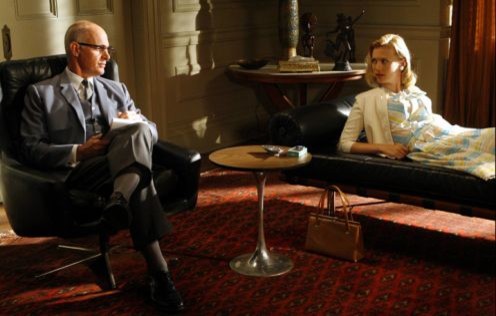

(Last image (Above) belongs to Set Decorator - Helen Britten)
Here is a work in progress of the scene I'm building:

Monday, 19 December 2011
Lip Sync: Test 4
Here is the fourth test, after tweaking the arm movements a fair bit to try and make them less symmetrical.
I could not render the video from Softimage to include the sound track I imported into the software so all this time I've been using Windows Movie Maker to add the sound and publish straight to my account on youtube (though for whatever reason I can't actually save the movie because it plays back with no sound - go figure :/). A classmate told me if I rendered using the hardware render instead of Mentalray the clip would come out with sound. I tried it but it renders all the controls on the rig plus an odd orange texture all over Malcolm's face. I aborted before it finished because though it would be helpful if sound was rendered too, is there really any point compromising the look of the rig? I could get rid of the controls but I have no idea why the face is all orange when I render that way. I'll stick to Movie Maker and Final Cut.
I could not render the video from Softimage to include the sound track I imported into the software so all this time I've been using Windows Movie Maker to add the sound and publish straight to my account on youtube (though for whatever reason I can't actually save the movie because it plays back with no sound - go figure :/). A classmate told me if I rendered using the hardware render instead of Mentalray the clip would come out with sound. I tried it but it renders all the controls on the rig plus an odd orange texture all over Malcolm's face. I aborted before it finished because though it would be helpful if sound was rendered too, is there really any point compromising the look of the rig? I could get rid of the controls but I have no idea why the face is all orange when I render that way. I'll stick to Movie Maker and Final Cut.
Malcolm character courtesy of AnimSchool.com
Monday, 12 December 2011
Lip Sync: Test 2
After some feedback, I've tweaked the animation a bit. I was told the arm movements were too symmetrical so I added some delay here and there, I've also animated the tongue.
Malcolm character courtesy of AnimSchool.com
Saturday, 10 December 2011
Lip Sync: Test 1
Our assignment (alongside the presentation) is to animate and lip sync to a chosen track. There were a few tracks to choose from but I went with one about Christmas eve.
It goes like this: "*Ahem* Blimey.. Sorry! Christmas Eve on a rooftop, saw a chimney, my whole brain just went... What the hell!"
Here are some planning sketches:


It goes like this: "*Ahem* Blimey.. Sorry! Christmas Eve on a rooftop, saw a chimney, my whole brain just went... What the hell!"
Here are some planning sketches:


Malcolm character courtesy of AnimSchool.com
Subscribe to:
Posts (Atom)